> For the complete documentation index, see [llms.txt](https://docs.digia.tech/llms.txt). Markdown versions of documentation pages are available by appending `.md` to page URLs; this page is available as [Markdown](https://docs.digia.tech/introduction/what-is-sdui.md).
# What is SDUI?
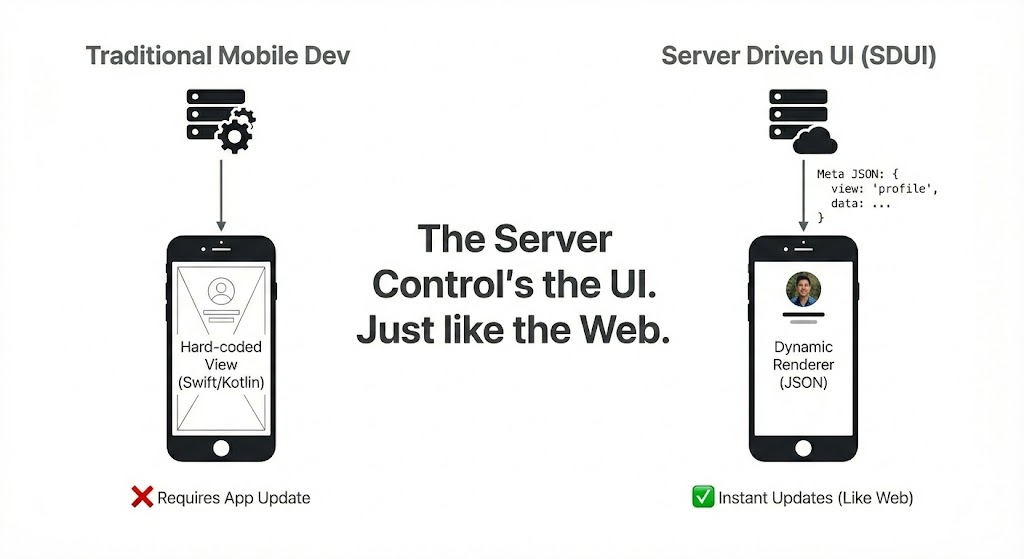
**Server-Driven UI (SDUI)** is an architectural pattern where the server controls the layout, content, and logic of a native application. Instead of hardcoding screens in the app binary, the device renders a UI based on a JSON configuration sent by the backend.
Basically: **The server defines *****what***** to show; the app knows *****how***** to render it.**
## Client-Driven vs Server-Driven
Traditional mobile development is **Client-Driven**: logic and layout are hardcoded in the app binary. This is like the early days of desktop software—to change anything, you must ship a new version.
**Server-Driven UI (SDUI)** flips this model. It operates like a modern web browser.
Just as a browser renders HTML & CSS sent from a server, an SDUI app renders native widgets based on a JSON schema.
```html
Welcome Back
```
```json
// SDUI: Example JSON structure
{
"type": "column",
"style": "card",
"children": [
{ "type": "text", "value": "Welcome Back", "style": "h1" },
{ "type": "button", "label": "Sign In", "action": "login" }
]
}
```
This allows you to ship updates, run experiments, and change layouts instantly, decoupling your release cycle from the App Store.
## SDUI vs. CMS: Spotting the Difference
You might be thinking, "**Isn't this just a Headless CMS?**" It’s a fair question, but the difference is fundamental.
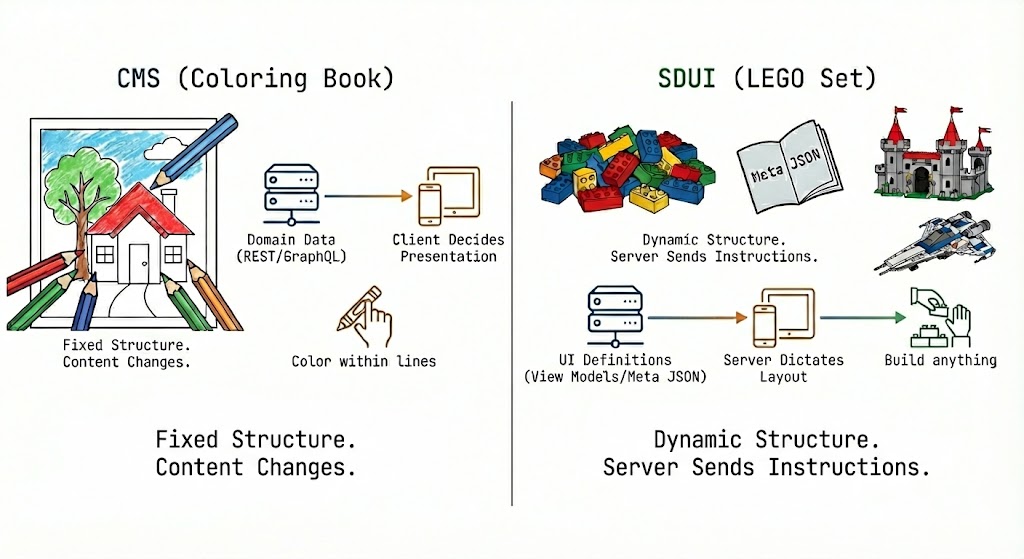
**Think of a CMS like a Coloring Book.** The outlines (layout) are already printed. You can choose to color the sky blue or purple (content), but you can’t move the sun or turn the tree into a car. The structure is fixed.
**SDUI is like a LEGO set.** The server gives you the bricks *and* the instruction manual. It sends a payload that says, "Take these header bricks, snap them onto this list, and put a button at the bottom." Today you build a castle; tomorrow you build a spaceship.
### The Breakdown
* **Architectural Focus**: CMS sends **data** (Text/Images). SDUI sends **UI definitions** (View Models).
* **Level of Control**: With a CMS, the *Client* decides how to present content. With SDUI, the *Server* dictates the layout.
* **The Difference**: CMS lets you change the paint; **SDUI lets you move the walls**.
## Why Developers Choose SDUI
* **Instant Updates**: Ship bug fixes, copy changes, or entire new flows instantly without waiting for App Store/Play Store review.
* **Cross-Platform Consistency**: Define your UI once in JSON and have it render natively on both iOS and Android.
* **Faster Experimentation**: Run A/B tests on layouts or components by simply serving different JSON responses to different users.
* **Thinner Clients**: Logic moves to the server, making the client app lighter and focused purely on performant rendering.
## Trade-offs to Consider
* **Offline Handling**: Since the UI definition comes from the server, you need a robust caching strategy for offline experiences.
* **Complex Gestures**: Highly interactive functionalit (like complex games or heavy animations) is often better implemented purely natively.
* **Debugging**: Errors in the JSON schema can cause rendering failures, requiring good validation tools.
## How Digia Implements SDUI
**Digia Studio** gives you the best of both worlds: a visual interface to build the configuration, and a native engine to render it.
1. **Visual Definition**: You build screens in the Digia Studio dashboard.
2. **JSON Generation**: Digia compiles your design into an optimized JSON schema.
3. **Native Rendering**: The Digia SDK (Flutter/React Native) interprets this JSON and renders **real native widgets**, ensuring 60fps performance and a native feel.