> For the complete documentation index, see [llms.txt](https://docs.digia.tech/llms.txt). Markdown versions of documentation pages are available by appending `.md` to page URLs; this page is available as [Markdown](https://docs.digia.tech/ui-building-blocks/widgets.md).
# Widget Catalog
In Digia Studio, you create the design of a page using things called [Widgets](/ui-building-blocks/widgets.md). These Widgets are organized into six main categories based on their functionality: [Layout & Structure](/ui-building-blocks/widgets/layout-structure-widgets.md), [Content & Display](/ui-building-blocks/widgets/content-display-widgets.md), [Input & Interaction](/ui-building-blocks/widgets/input-interaction-widgets.md), [Navigation](/ui-building-blocks/widgets/navigation-widgets.md), [Scrolling](/ui-building-blocks/widgets/scrolling-widgets.md), and [Media & Async](/ui-building-blocks/widgets/media-async-widgets.md).
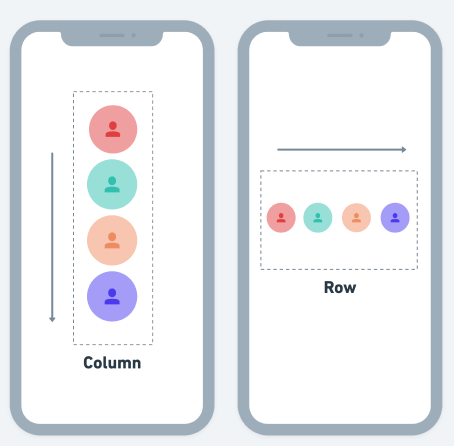
Some Widgets like [Text](/ui-building-blocks/widgets/content-display-widgets/text.md), [Buttons](/ui-building-blocks/widgets/input-interaction-widgets/button.md) and [Images](/ui-building-blocks/widgets/content-display-widgets/image.md) can be seen on the screen. Others, like [Containers](/ui-building-blocks/widgets/layout-structure-widgets/container.md), [Rows](https://github.com/Digia-Technology-Private-Limited/digiaDocs/blob/main/docs/building-ui/widgets/layout-structure-widgets/row.md), and [Columns](https://github.com/Digia-Technology-Private-Limited/digiaDocs/blob/main/docs/building-ui/widgets/layout-structure-widgets/column.md), are not visible, but they help in putting everything in the right place on the page.
To build a page, you pick and combine different widgets from these groups. It's like putting together building blocks to create the look and feel of your app. By using these widgets in the right way, you can make the app look just the way you want it to.
Widgets are essential in creating the user interface of your app. On this page, you will learn what is a widget, Widget tree, how to work with them, and how to use widget properties.
For extending Digia UI with custom native Flutter components, see [Custom Widgets](/extend-and-ship/custom-widgets.md).
## What is a Widget?
In Digia Studio, the widget is the UI element that helps you build the layout of your page. Almost everything that you see on the page is a widget. You build the UI by combining the widgets in a parent-child relationship.
[Text](/ui-building-blocks/widgets/content-display-widgets/text.md), [Row](https://github.com/Digia-Technology-Private-Limited/digiaDocs/blob/main/docs/building-ui/widgets/layout-structure-widgets/row.md), [Column](https://github.com/Digia-Technology-Private-Limited/digiaDocs/blob/main/docs/building-ui/widgets/layout-structure-widgets/column.md), and [Container](/ui-building-blocks/widgets/layout-structure-widgets/container.md) are the most basic types of widgets. You will learn about using them to build a layout here.
## Widget tree
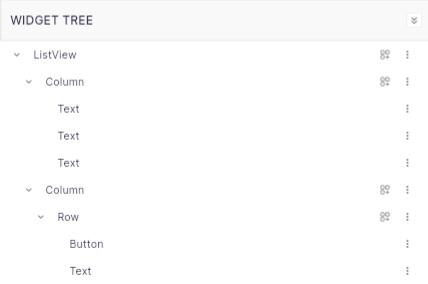
When you put widgets together or place them inside another widget, they create something called a "Widget Tree." This tree can be found in the [Pages and Widget Panel](broken://pages/WnkDCQcy8jtp2hvS9d3u) on the left side of your screen. It shows how many widgets are on a page and how they're connected (as a parent-child relationship). This helps you understand your app's structure and how things fit together visually.
As the complexity of a UI increases, the widget tree tends to become longer and deeper, making it challenging to locate specific widgets.